
部署项目
打包
运行pnpm run build打包项目
生成部署压缩文件
将下列目录/文件压缩为dist.zip文件,发布到服务器,并解压。
├──dist
├──logs
├──public
├──uploadFile
├──addons/ (需要排除子目录的node_modules文件夹)
├──view/admin/dist
├──view/admin/package.json
├──view/index/dist
├──view/index/package.json
├──.env
├──.npmrc
├──bootstrap.js
├──package.json
├──pnpm-lock.yaml
└── pnpm-workspace.yaml
这里有一个windows下的打包脚本 compress.ps1
# encoding: gbk
# 定义配置变量
$Config = @{
    # 需要直接包含的根目录下的文件夹列表
    RootFolders = @('dist', 'logs', 'public', 'uploadFile')

    # 需要包含的特定子目录路径
    SpecialDirs = @('view/admin/dist', 'view/index/dist')

    # 需要包含的根目录下的文件列表
    RootFiles = @('.env', '.npmrc', 'bootstrap.js', 'package.json', 'pnpm-lock.yaml', 'pnpm-workspace.yaml')

    # 需要包含的特定文件路径
    SpecialFiles = @('view/admin/package.json', 'view/index/package.json')

    # 需要处理的父目录(其子目录会被包含,但排除特定子目录)
    ParentDirs = @('addons')

    # 在ParentDirs指定的目录中要排除的子目录名(会递归排除所有层级)
    ExcludeSubdirs = @('node_modules')
}

# 函数:将字节数转换为合适的单位
function Format-FileSize {
    param([long]$Size)

    if ($Size -lt 1KB) {
        return "$Size B"
    } elseif ($Size -lt 1MB) {
        return "$([math]::Round($Size/1KB, 2)) KB"
    } elseif ($Size -lt 1GB) {
        return "$([math]::Round($Size/1MB, 2)) MB"
    } elseif ($Size -lt 1TB) {
        return "$([math]::Round($Size/1GB, 2)) GB"
    } else {
        return "$([math]::Round($Size/1TB, 2)) TB"
    }
}


# 获取当前目录
$BaseDir = Get-Location
$OutputZip = Join-Path $BaseDir "dist_$(Get-Date -Format 'yyyyMMdd_HHmmss').zip"
$TempDir = Join-Path $env:TEMP "temp_zip_$((Get-Random))"

Write-Host "开始执行压缩脚本..." -ForegroundColor Green
Write-Host "当前工作目录: $BaseDir" -ForegroundColor Yellow
Write-Host ""

try {
    # 创建临时目录
    Write-Host "创建临时目录: $TempDir" -ForegroundColor Cyan
    New-Item -ItemType Directory -Path $TempDir -Force | Out-Null

    Write-Host "正在准备压缩文件..." -ForegroundColor Cyan

    # 复制根目录下的文件夹
    foreach ($Folder in $Config.RootFolders) {
        $SourcePath = Join-Path $BaseDir $Folder
        $TargetPath = Join-Path $TempDir $Folder

        if (Test-Path $SourcePath) {
            Write-Host "正在添加 $Folder..." -ForegroundColor White
            # 复制时不包括node_modules
            robocopy $SourcePath $TargetPath /E /XD node_modules /NFL /NDL /NP | Out-Null
            Write-Host "成功添加 $Folder" -ForegroundColor Green
        } else {
            Write-Host "警告: $Folder 不存在" -ForegroundColor Yellow
        }
    }

    # 复制特定子目录
    foreach ($Dir in $Config.SpecialDirs) {
        $SourcePath = Join-Path $BaseDir $Dir
        $TargetPath = Join-Path $TempDir $Dir

        if (Test-Path $SourcePath) {
            $TargetDir = Split-Path $TargetPath -Parent
            if (!(Test-Path $TargetDir)) {
                New-Item -ItemType Directory -Path $TargetDir -Force | Out-Null
            }
            Write-Host "正在添加 $Dir..." -ForegroundColor White
            Copy-Item -Path $SourcePath -Destination $TargetPath -Recurse -Force
            Write-Host "成功添加 $Dir" -ForegroundColor Green
        } else {
            Write-Host "警告: $Dir 不存在" -ForegroundColor Yellow
        }
    }

    # 复制根目录下的文件
    foreach ($File in $Config.RootFiles) {
        $SourcePath = Join-Path $BaseDir $File
        $TargetPath = Join-Path $TempDir $File

        if (Test-Path $SourcePath) {
            Write-Host "正在添加 $File..." -ForegroundColor White
            Copy-Item -Path $SourcePath -Destination $TargetPath -Force
            Write-Host "成功添加 $File" -ForegroundColor Green
        } else {
            Write-Host "警告: $File 不存在" -ForegroundColor Yellow
        }
    }

    # 复制特定文件
    foreach ($SpecialFile in $Config.SpecialFiles) {
        $SourcePath = Join-Path $BaseDir $SpecialFile
        $TargetPath = Join-Path $TempDir $SpecialFile

        if (Test-Path $SourcePath) {
            $TargetDir = Split-Path $TargetPath -Parent
            if (!(Test-Path $TargetDir)) {
                New-Item -ItemType Directory -Path $TargetDir -Force | Out-Null
            }
            Write-Host "正在添加 $SpecialFile..." -ForegroundColor White
            Copy-Item -Path $SourcePath -Destination $TargetPath -Force
            Write-Host "成功添加 $SpecialFile" -ForegroundColor Green
        } else {
            Write-Host "警告: $SpecialFile 不存在" -ForegroundColor Yellow
        }
    }

    # 处理父目录下的子目录(排除特定子目录)
    foreach ($ParentDir in $Config.ParentDirs) {
        $SourceParentPath = Join-Path $BaseDir $ParentDir

        if (Test-Path $SourceParentPath) {
            Write-Host "正在处理 $ParentDir 目录..." -ForegroundColor Cyan

            # 使用robocopy复制整个目录,但排除所有node_modules
            $TargetParentPath = Join-Path $TempDir $ParentDir
            if (!(Test-Path $TargetParentPath)) {
                New-Item -ItemType Directory -Path $TargetParentPath -Force | Out-Null
            }

            # robocopy的/XD参数可以排除多个目录,包括嵌套的
            $excludeArgs = @()
            foreach ($excludeDir in $Config.ExcludeSubdirs) {
                $excludeArgs += "/XD"
                $excludeArgs += $excludeDir
            }

            $robocopyArgs = @(
                $SourceParentPath,
                $TargetParentPath,
                '/E'
            ) + $excludeArgs + @('/NFL', '/NDL', '/NP')

            & robocopy @robocopyArgs | Out-Null

            Write-Host "成功处理 $ParentDir 目录(已排除所有 $(($Config.ExcludeSubdirs -join ', ')) 目录)" -ForegroundColor Green
        } else {
            Write-Host "警告: 父目录 $ParentDir 不存在" -ForegroundColor Yellow
        }
    }

    # 创建ZIP压缩文件
    Write-Host ""
    Write-Host "正在创建ZIP压缩文件..." -ForegroundColor Cyan
    Compress-Archive -Path "$TempDir\*" -DestinationPath $OutputZip -Force

    # 清理临时目录
    if (Test-Path $TempDir) {
        Write-Host "清理临时目录..." -ForegroundColor Cyan
        Remove-Item -Path $TempDir -Recurse -Force
    }

    # 输出结果
    Write-Host ""
    if (Test-Path $OutputZip) {
        Write-Host "=" * 60 -ForegroundColor Green
        Write-Host "压缩完成!ZIP文件已保存为: $OutputZip" -ForegroundColor Green
        $ZipItem = Get-Item $OutputZip
        $FileSizeFormatted = Format-FileSize $ZipItem.Length
        Write-Host "ZIP文件大小: $FileSizeFormatted" -ForegroundColor Green
        Write-Host "创建时间: $($ZipItem.CreationTime.ToString('yyyy-MM-dd HH:mm:ss'))" -ForegroundColor Green
        Write-Host "=" * 60 -ForegroundColor Green
    } else {
        Write-Host "=" * 60 -ForegroundColor Red
        Write-Host "压缩失败!请检查是否有错误信息。" -ForegroundColor Red
        Write-Host "=" * 60 -ForegroundColor Red
    }

} catch {
    Write-Host ""
    Write-Host "发生错误: $($_.Exception.Message)" -ForegroundColor Red
}

Write-Host ""
Write-Host "按 Enter 键退出..."
Read-Host
将 compress.ps1 文件 放到项目根目录,直接在powershell命令窗口运行./compress.ps1即可得到部署文件dist.zip
脚本文件必须用gbk字符集保存
服务器部署
建议使用宝塔面板管理服务器,这里以宝塔部署为例 宝塔面板安装链接。
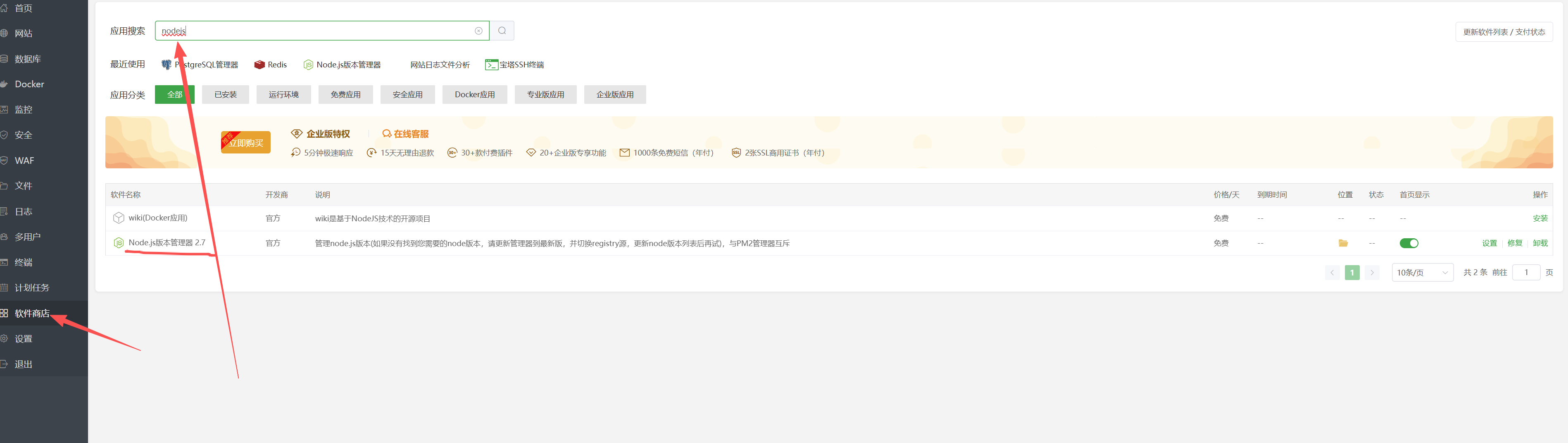
安装nodejs管理器
- 在宝塔面板的 软件商店 搜索
nodejs安装nodejs版本管理器 - 安装完后点击设置,设置nodejs命令行版本为22.15.1
上传部署文件
- 在宝塔面板 文件 菜单 打开
www/wwwroot文件夹,新建meadmin文件夹 - 打开
meadmin文件夹,将第一步生成dist.zip上传至文件夹下并解压 - 将
logs、uploadFile文件夹权限设置为777
安装pnpm包
- 进入宝塔面板的终端文件夹,依次执行以下命令
npm -g install pnpmcd www/wwwroot/meadminpnpm install
创建网站
- 进入宝塔面板的 网站菜单 选择 node项目
- 点击添加node项目,选择
PM2项目 - 启动文件设置为
/www/wwwroot/meadmin/bootstrap.js - 运行目录设置为
/www/wwwroot/meadmin - 负载实例设置为
2(注意 必须是PM2的集群模式启动,数量必须大于1) - 环境变量设置
NODE_ENV=prod - 包管理器选
pnpm - 项目端口
7001 - 如需绑定域名的可输入域名
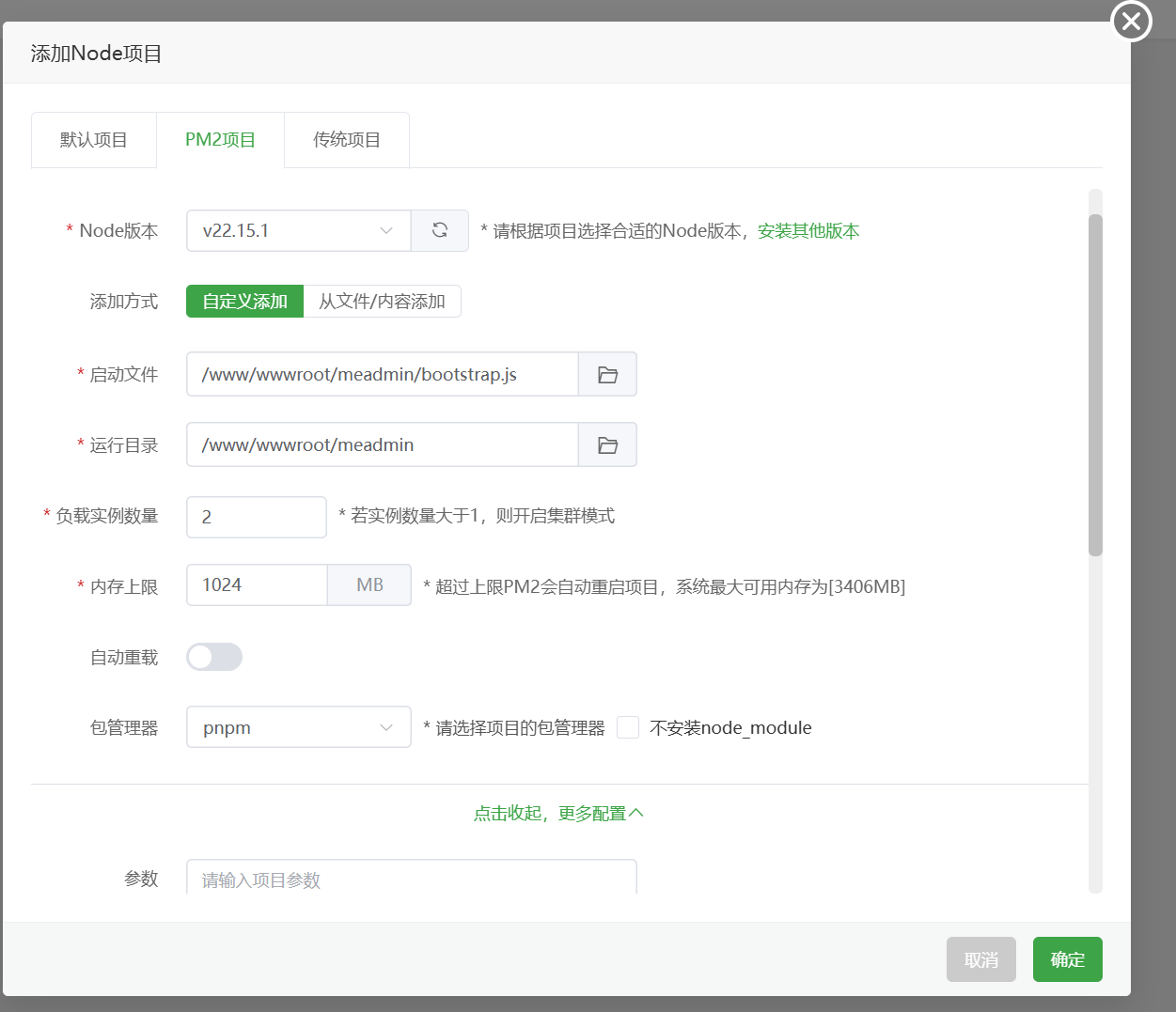
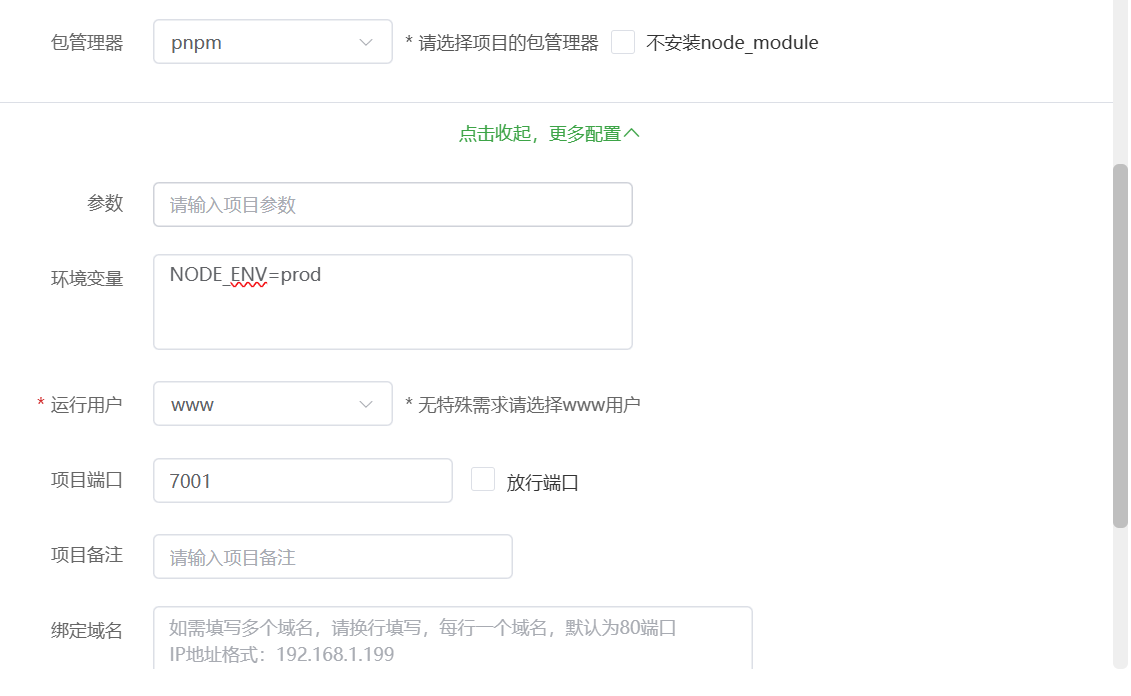
如果遇到错误 可以,点击pm2监控 查看 PM2启动日志
或者到/www/wwwroot/meadmin/logs文件夹查看项目日志
设置 伪静态
如果部署域名,可以点击右侧的设置按钮, 在伪静态配置中添加以下代码,加快静态资源访问速度:
location /html/index/{
  alias /www/wwwroot/meadmin/view/index/dist/;

}

location /html/admin/{
  alias /www/wwwroot/meadmin/view/admin/dist/;
}

location /html/admin/ssr-manifest.json{
 return 404;
}
location /html/index/ssr-manifest.json{
  return 404;
}